
Protecting Sensitive Personal & Business Data: 5 Tips for Healthcare Facilities and Businesses

TL;DR/ Quick Answer: Protecting sensitive personal and business data requires more than just strong passwords. Healthcare facilities, clinics, and businesses should maintain a data inventory, restrict access to confidential information, train employees, securely destroy paper records, and properly dispose of old electronic devices. Following these five practices can help reduce data breaches, support HIPAA and California privacy compliance, and protect patient and customer information. |
Every clinic, dental office, surgery center, pharmacy, and small business in San Diego handles information that needs to stay protected. This includes patient records, insurance details, employee files, client contracts, billing information, and other confidential business documents.
A single misplaced folder, unsecured computer, or improperly discarded hard drive can expose sensitive information and create serious compliance and financial problems.
According to IBM's 2026 Cost of a Data Breach Report, the global average cost of a data breach reached $4.99 million, while the average cost in the United States reached $11.5 million. Healthcare remained the most expensive industry for data breaches, with an average cost of $6.64 million per incident. These numbers show why protecting sensitive information should be a priority for organizations of every size.
The good news is that many data exposure risks can be reduced through simple, consistent security practices. Here are five practical ways to protect personal and business information.

Why Is Sensitive Data Protection Important for Healthcare Facilities and Businesses?
Sensitive data protection is important because organizations have a responsibility to keep personal, financial, medical, and business information secure. Failing to do so can lead to data breaches, financial penalties, legal issues, and loss of customer trust.
Two important areas businesses should understand are HIPAA requirements and California privacy laws.
1. Understanding HIPAA Data Protection Requirements
The Health Insurance Portability and Accountability Act (HIPAA) requires covered healthcare organizations and their business associates to protect electronic protected health information (ePHI).
The HIPAA Security Rule requires administrative, physical, and technical safeguards to protect patient information.
In January 2025, the U.S. Department of Health and Human Services (HHS) proposed updates to strengthen the HIPAA Security Rule. These proposed changes include:
Mandatory encryption of electronic protected health information.
Multi-factor authentication (MFA).
Written inventories of systems that handle patient information.
Stronger cybersecurity and risk management requirements.
Requirements for restoring certain affected systems within 72 hours.
These changes remain proposed requirements rather than finalized rules as of October 2026. However, healthcare organizations should consider strengthening their security practices in preparation for tighter cybersecurity expectations.
2. Understanding California Data Privacy and Destruction Requirements
California businesses must also understand their responsibilities under the California Consumer Privacy Act (CCPA), as amended by the California Privacy Rights Act (CPRA).
Depending on the applicable requirements, violations can result in administrative penalties of up to $2,663 per violation and $7,988 for intentional violations under the current adjusted amounts.
Consumers may also have a private right of action following certain breaches involving specified categories of unencrypted and unredacted personal information. Statutory damages range from $107 to $799 per consumer per incident, or actual damages if greater.
California Civil Code Section 1798.81 also requires businesses to take reasonable steps to dispose of customer records containing personal information when they are no longer needed. This can include shredding paper records, erasing electronic information, or otherwise making the information unreadable.
For healthcare facilities and businesses, this makes secure document shredding and electronic waste disposal an important part of data protection.
5 Tips to Protect Sensitive Personal and Business Data
Protecting confidential information starts with understanding what data you have, who can access it, and how it is eventually destroyed. The following five practices can help reduce common security risks.
Tip 1: Know Exactly What Sensitive Data You Hold and Where It Is Stored
You cannot protect information if you do not know where it is stored. Patient records, financial documents, employee information, and confidential business files can exist in several places, including shared drives, filing cabinets, email accounts, laptops, and backup devices.
Start by creating a simple data inventory.
What should a sensitive data inventory include?
Types of information: Identify patient health records, Social Security numbers, insurance details, payment information, employee records, vendor contracts, and confidential business documents.
Storage locations: Check paper files, cloud applications, email accounts, laptops, mobile phones, USB drives, printers, and copiers.
Data classification: Identify which information needs the highest level of protection, such as protected health information (PHI) and financial records.
Retention periods: Decide how long different records must be kept under applicable laws and internal policies.
A proper data inventory also helps healthcare organizations conduct the security risk analysis required under HIPAA.
Why does data inventory matter?
It helps organizations identify overlooked storage locations, understand potential security risks, and decide which records need additional protection or secure destruction.
Tip 2: Limit Access and Secure Your Digital Data
Once you know where sensitive information is stored, the next step is controlling who can access it.
Employees should only have access to the information they need to perform their jobs. This is commonly known as the principle of least privilege.
How can businesses protect digital information?
Use role-based access: Give employees access based on their job responsibilities. A front desk coordinator may not need the same permissions as a billing manager or healthcare provider.
Enable multi-factor authentication (MFA): Add an extra layer of security to email accounts, patient management systems, cloud storage, and remote access.
Encrypt sensitive information: Protect data stored on laptops, phones, servers, backup drives, and information shared through digital communication.
Remove outdated access: Immediately disable accounts when employees leave or change roles.
Update software regularly: Install security updates and replace systems that no longer receive security support.
Businesses should also pay attention to shadow IT, which refers to applications and tools employees use without official approval.
For example, employees sharing patient records through personal email accounts, unapproved file-sharing applications, or unsecured AI tools can expose confidential information.
IBM's 2025 research also found that organizations with high levels of shadow AI experienced higher average breach costs than those with lower levels.
Why is controlling digital access important?
Limiting access reduces the chances of unauthorized users viewing, sharing, or misusing sensitive information.
Tip 3: Train Your Team to Handle Sensitive Information Properly
Even the strongest security systems cannot prevent every mistake. Employees can accidentally send confidential information to the wrong person, fall for phishing emails, leave documents unattended, or share information without realizing the risks.
That is why employee training should be part of every organization's data protection strategy.
What should employee data security training cover?
HIPAA awareness: Teach healthcare employees how to handle and protect patient information.
Phishing awareness: Show employees how to identify suspicious emails, links, and attachments.
Safe document handling: Explain how to store, share, and dispose of confidential paperwork.
Password security: Encourage strong passwords and multi-factor authentication.
Incident reporting: Make sure employees know whom to contact if information is accidentally exposed.
Training should be provided during onboarding and refreshed regularly.
It is also important to create a workplace where employees feel comfortable reporting mistakes. Quick reporting can help organizations respond before a small incident becomes a larger data breach.
Businesses should maintain a written incident response plan that explains who to contact, how to secure affected systems, and how to handle required notifications.
San Diego Medical Waste Services offers on-demand online training covering HIPAA and OSHA topics, helping healthcare facilities keep their employees informed about important compliance and safety practices.
Tip 4: Destroy Paper Records Securely and Maintain Proof of Destruction
Paper records still contain a significant amount of confidential information in healthcare facilities and businesses.
Patient intake forms, prescriptions, lab reports, signed consent forms, invoices, employee records, and printed emails should never be thrown into regular trash or recycling bins.
How should businesses dispose of confidential paper documents?
There are three important steps to follow.
1. Use Secure Collection Containers
Place locked shredding containers in offices, reception areas, records rooms, and other locations where confidential documents are handled.
This prevents unauthorized individuals from accessing discarded paperwork.
2. Schedule Professional Document Shredding
Arrange regular document shredding services to prevent confidential paperwork from accumulating in storage rooms and office spaces.
Professional shredding methods should make documents unreadable and unsuitable for reconstruction.
3. Maintain a Certificate of Destruction
Ask your shredding provider for a Certificate of Destruction after each service.
This document provides a record that confidential materials were collected and destroyed. It can also help demonstrate that your organization follows a documented disposal process.
The Federal Trade Commission's Disposal Rule requires covered organizations to take reasonable measures when disposing of certain consumer report information to prevent unauthorized access.
San Diego Medical Waste Services provides document shredding and paper recycling services for healthcare facilities and businesses, helping protect patient information and confidential business records through secure collection and destruction.
Tip 5: Treat Old Electronic Devices as Data Security Risks
Old electronic devices can contain sensitive information even after they are no longer being used.
Computers, laptops, mobile phones, tablets, external hard drives, printers, copiers, and certain medical devices may store patient records, financial information, and confidential business files.
Simply deleting files or sending old equipment to a general recycler does not guarantee that the information has been permanently removed. How should businesses securely dispose of old electronic devices?
Organizations can follow the guidance in NIST Special Publication 800-88 Revision 2, released in September 2025. It provides guidelines for establishing a media sanitization program and selecting appropriate methods based on the sensitivity of stored information.
Common media sanitization approaches include:
Clear: Uses logical techniques to remove data from storage media, generally making it suitable for reuse.
Purge: Uses stronger sanitization methods, such as cryptographic erase, to make data recovery significantly more difficult.
Destroy: Physically destroys storage media when secure reuse or sanitization is not appropriate.
The appropriate method depends on the device, storage technology, sensitivity of the information, and whether the equipment will be reused.
For devices containing sensitive patient or financial information, physical destruction may be an appropriate option when secure sanitization cannot be verified.
Organizations should also maintain proper disposal records, including:
Device identification and inventory.
Date of disposal.
Sanitization or destruction method.
Name of the responsible vendor.
Verification or certificate of destruction, where provided.
SD Med Waste's electronic recycling and e-waste disposal services help healthcare facilities and businesses retire old equipment while reducing the risk of sensitive information falling into the wrong hands.
How Can Businesses Start Improving Data Protection in 30 Days?
Improving data security does not have to happen all at once. Businesses can start with a simple 30-day plan and gradually build better practices.
Timeline | Recommended Action |
Week 1 | Create an inventory of sensitive paper and digital records. |
Week 2 | Enable multi-factor authentication and review employee access permissions. |
Week 3 | Schedule employee security training and install locked shredding containers. |
Week 4 | Review old electronic devices, arrange secure e-waste disposal, and establish a regular document shredding schedule. |
Following this plan gives organizations a starting point for improving data security and managing confidential information more responsibly.
Key Takeaways: Protecting Sensitive Personal and Business Data
Protecting confidential information requires consistent attention to both digital security and physical document disposal.
Here are five important practices to remember:
Know your data: Identify what sensitive information you collect and where it is stored.
Control access: Use role-based permissions, encryption, and multi-factor authentication.
Train employees: Make sure your team understands how to handle confidential information and report security incidents.
Shred paper records: Use secure collection containers and professional document destruction services.
Dispose of electronic devices properly: Follow recognized media sanitization guidelines and maintain disposal records.
Data protection is not a one-time task. It requires regular reviews, employee awareness, and responsible disposal practices.
For healthcare facilities and businesses in San Diego, having a reliable approach to document shredding and electronic waste disposal can help reduce information exposure risks and support better compliance practices.
Frequently Asked Questions (FAQs)
1. What counts as sensitive personal and business data?
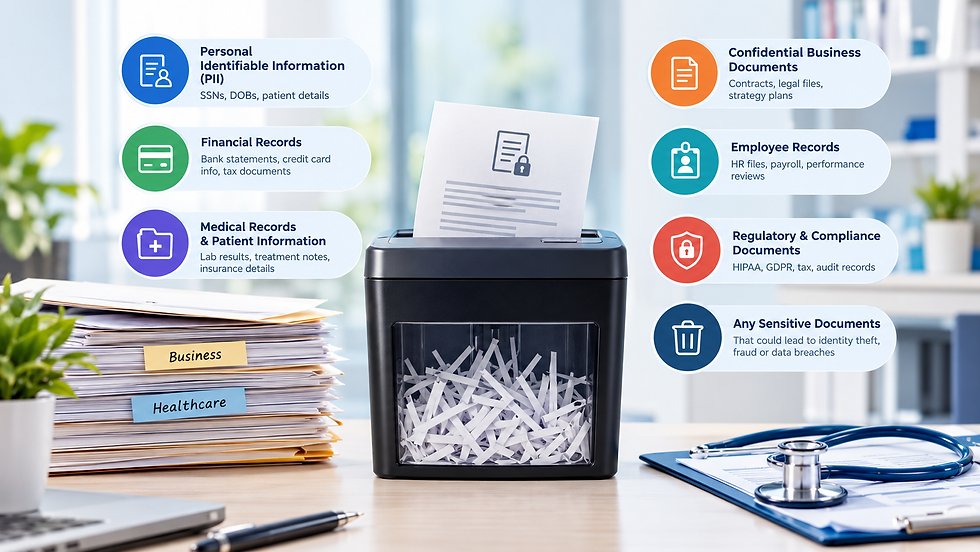
Sensitive personal data includes information that can identify an individual or expose them to identity theft, financial loss, or privacy risks. Examples include Social Security numbers, medical records, insurance details, financial account information, and driver's license numbers.
Sensitive business data includes employee records, client lists, financial statements, contracts, pricing information, trade secrets, and internal business documents.
2. Does HIPAA require encryption of patient information?
Under the current HIPAA Security Rule, encryption is classified as an addressable implementation specification. Organizations must assess whether it is reasonable and appropriate and either implement it or document why an equivalent alternative is appropriate. HHS proposed making encryption mandatory in January 2025, but the proposal has not been finalized as of October 2026.
3. How long should businesses keep patient and confidential records?
Record retention periods depend on the type of information, applicable federal and state laws, and organizational policies. Healthcare providers should check the requirements that apply to their specific practice. Businesses should also maintain a written retention schedule and securely destroy records once they are no longer required and no legal hold applies.
4. Is it safe to put confidential documents in a regular recycling bin?
No. Regular recycling bins and dumpsters do not provide secure protection for confidential documents. Paper containing patient information, financial details, or personal records should be collected in locked containers and destroyed through a secure shredding process.
5. Do small clinics and businesses need to worry about data protection?
Yes. HIPAA applies to covered entities and business associates regardless of their size. California privacy laws also apply to businesses that meet the relevant legal requirements. Smaller organizations can face serious financial, legal, and reputational consequences if sensitive information is exposed.
6. What is the difference between wiping a hard drive and physically destroying it?
Wiping or sanitizing a hard drive involves using approved techniques to make stored information inaccessible. Physical destruction involves shredding, crushing, or otherwise destroying the storage media so it cannot be reused.
The appropriate method depends on the sensitivity of the information and whether the device will be reused.
7. What should I look for when hiring a document shredding or e-waste disposal company?
Before choosing a service provider, ask about:
How confidential materials are secured during collection and transportation.
What shredding or electronic sanitization methods are used.
Whether the provider follows recognized industry guidelines.
Whether certificates of destruction or other disposal records are provided.
How healthcare-related information is handled.
Choosing a provider with a documented collection and destruction process can help organizations manage confidential waste more responsibly.
8. What should I do if I suspect sensitive information has been exposed?
Act quickly. Secure affected documents or isolate compromised systems, notify your organization's privacy or compliance officer, preserve relevant evidence, and follow your incident response plan.
Healthcare organizations and businesses should also review applicable breach notification requirements and consult legal counsel to determine the next steps.
9. Does SD Med Waste offer document shredding and e-waste disposal services in San Diego?
Yes. San Diego Medical Waste Services provides document shredding and paper recycling, electronic recycling and e-waste disposal, and on-demand online OSHA and HIPAA training for healthcare facilities and businesses.
The locally owned and veteran-owned company has served San Diego County since 2014 and also provides biohazard, sharps, and pharmaceutical waste services.
Protect Your Data from Pickup to Final DestructionYour patients, employees, and clients trust you with their most sensitive information. Protecting that information also means making sure confidential documents and electronic devices are handled and disposed of properly. San Diego Medical Waste Services helps healthcare facilities and businesses manage document shredding, paper recycling, electronic recycling, and other regulated waste disposal needs. SAN DIEGO MEDICAL WASTE SERVICES 📍 8940 Activity Rd. Suite H, San Diego, CA 92126 📞 619-990-4604 |
Disclaimer: This article is for general informational purposes only and does not constitute legal or compliance advice. Requirements may vary depending on your organization and the type of information you handle. Consult your attorney or compliance officer for guidance specific to your business.


Comments